

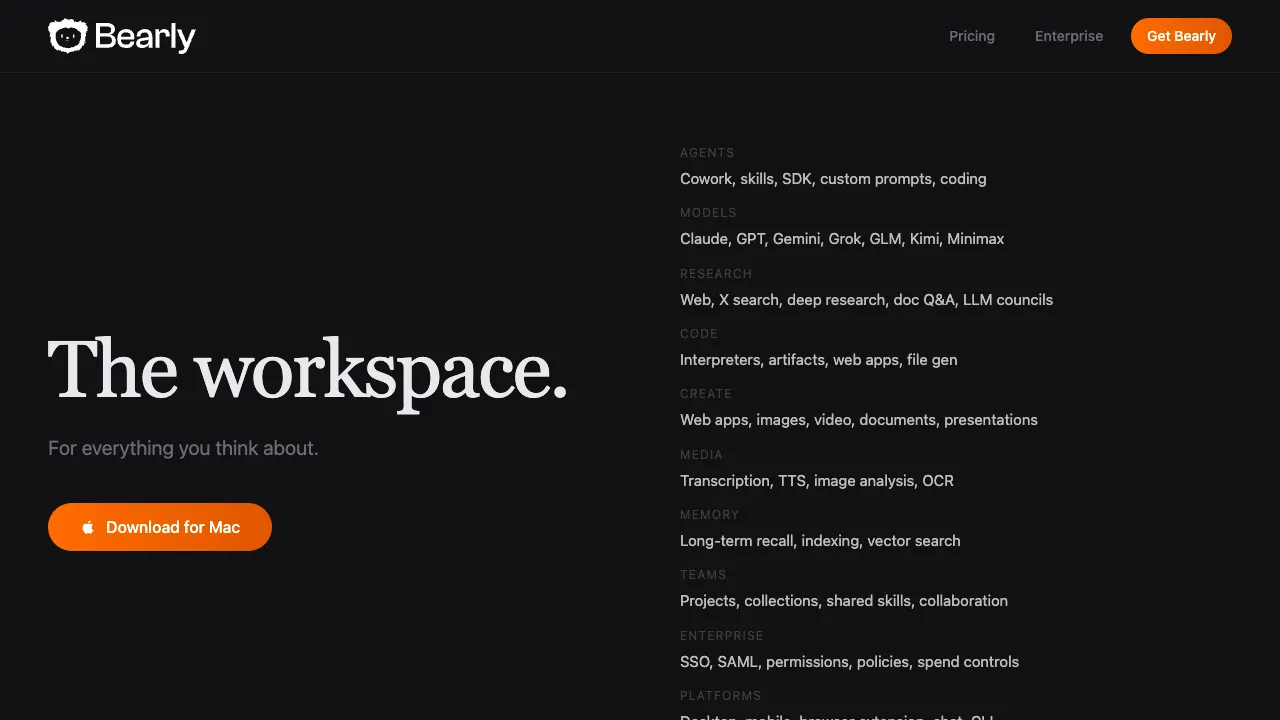
The product's scope has widened considerably. It began as an English reading and writing productivity tool; it now positions itself as a private AI workspace covering agents (routines, cowork, skills, an SDK, custom prompts, coding), many models (Claude, GPT, Gemini, Grok, GLM, Kimi, Minimax), research (web, deep research, document Q&A, LLM councils), data, code interpreters, creation, media processing, long-term memory and team collaboration, reachable from desktop, mobile, a browser extension, chat and a CLI. The description below reflects the current product.
English reading and writing consume a significant amount of time for knowledge workers: reading reports, viewing articles, processing documents, drafting emails, and organizing notes. These tasks are not inherently difficult, but they become time-consuming when done in large volumes. Furthermore, you often need to switch between different tools—wanting to summarize an article just read? You must open another AI tool. Want the AI to polish an email draft? That requires switching pages again. Bearly's design philosophy is to consolidate these fragmented AI needs into a single keyboard shortcut, allowing you to invoke AI processing for current content from anywhere at any time.
What is Bearly
Bearly is a desktop application for Mac (with partial support for Windows) that primarily functions by popping up an floating AI panel in any app via a global hotkey (default: Option + Space). Within this panel, you can process the currently selected text—summarizing, translating, rewriting, or continuing it—or ask questions and write without switching to other applications or browsers.
It integrates multiple AI models: GPT-4, Claude, and other mainstream models. You can select a model based on your task needs, paying according to actual usage (using your own API Key or the quota provided by Bearly).
Core Features
Global Hotkey Invocation
This is Bearly's core user experience. Regardless of which application you are using—Safari, Chrome, Word, Pages, Notion, email clients—and so on—pressing the hotkey brings up Bearly's panel on your screen. If you have previously selected text, that selection automatically appears in the panel for AI processing when ready.
This global invocation design reduces the friction of "needing AI assistance but first having to open another program," transforming AI tools into an omnipresent utility rather than a platform requiring specific navigation to use.
Reading Assistance
Summarize: Select an article or passage, and generate a summary with one click. Quickly grasp main points when reading long articles to judge whether deep diving is worthwhile.
Explain: Select complex text or paragraphs you don't understand, letting the AI explain them in simpler language. This is highly useful for reading English professional documents, technical articles, and academic papers.
Translate: Rapidly translate selected English into Chinese (or other languages). No need to copy content to a translation website; process it directly at your current reading location.
Writing Assistance
Improve: Select text you have written, letting the AI enhance expression to make it clearer and more fluent.
Continue: Place your cursor where you stopped writing, allowing the AI to continue from there, breaking through writer's block.
Rephrase: Rewrite a passage in different expressions, such as switching between formal and informal styles.
Shorten/Expand: Adjust text length to adapt to different scenario requirements.
Custom Shortcuts
Bearly supports users creating custom shortcuts. For instance, if you frequently need "to rewrite this paragraph into a style suitable for LinkedIn," save that instruction as a shortcut. Later, select the text and trigger the hotkey; it's done without manually entering prompts each time.
For those with fixed, repetitive workflows, this feature turns common operations into one-click tasks.
Multi-Model Support
Bearly is not bound to a single AI model. It supports connecting via your own API Key to mainstream models like OpenAI (GPT-4, GPT-4o) and Anthropic (Claude). You can switch based on the task: use Claude for high-quality writing or GPT-3.5 for quick summaries to save costs.
Comparison with Other Tools
vs ChatGPT / Claude Web Versions: These require opening a browser, switching tabs, then copying and pasting content there for processing. Bearly compresses this process into a single hotkey completed within the current application. If your work rhythm demands frequent AI use, this reduction in context switching represents genuine efficiency gains.
vs Raycast AI / Alfred AI: Raycast and Alfred are also Mac-based productivity tools triggered by hotkeys with AI capabilities. The difference lies in Bearly's focus on reading and writing scenarios, offering richer text processing presets; Raycast/Alfred are more general-purpose, where AI is just one component among many.
vs Immersive Translate: Immersive Translate focuses on web translation within browsers. Bearly is a system-level tool usable in any Mac application, with functionality extending beyond mere translation.
vs Grammarly: Grammarly focuses on English grammar correction as a real-time checking tool. Bearly offers broader AI assistance—summarizing, translating, continuing—but does not perform real-time grammar checks. Both can coexist serving different roles.
Who Is It For
Those Consuming Large Volumes of English Content: Researchers, analysts, and professionals reviewing extensive English reports. The quick summarization and explanation features significantly boost information processing efficiency.
Frequent Cross-App Text Processors: Writing emails in Mail, documents in Word, viewing materials in Safari—Bearly enables AI invocation across these disparate apps without switching contexts.
English Writers (Non-Native Speakers): Rapidly polish, translate, or rewrite English in any scenario without specifically switching to a dedicated writing tool.
Those with Fixed Repetitive Writing Needs: Automate frequently used AI tasks via custom shortcuts, such as "summarize meeting notes" or "convert to email format."
Pricing
The site has a dedicated pricing page and an enterprise entry point, but no tiers or amounts appear on publicly readable pages, so no figures are given here. Trust the pricing page at bearly.ai.
What is verifiable on the product side: the main entry point is a desktop download (a macOS build is offered), alongside mobile, a browser extension, chat and a CLI, and the enterprise tier includes SSO, SAML, permissions, policies and spend controls.
Privacy is its stated differentiator: the site says every chat and file is individually encrypted, that there are no ads, and that your data is not used to train models, noting that it is made and hosted in the U.S.
Limitations
Primarily Mac-Centric: Bearly's global hotkeys and system integration focus on macOS; Windows versions have limited functionality, significantly reducing value for non-Mac users.
English-Focused Scenarios: Tool design and optimization prioritize English reading and writing scenarios. While usable for Chinese contexts, optimizations are not as deep or specialized compared to English support.
Requires Internet Connection: All features rely on network calls to AI APIs; offline usage is impossible.
Not a Document Management Tool: Bearly acts as an "on-demand" AI assistant rather than storing your documents or organizing notes. It cannot replace knowledge management tools like Notion or Obsidian.
Dependent on Third-Party Models: Feature quality depends entirely on underlying AI models, with no specialized optimization of its own AI capabilities inherent to the software itself.
Practical Recommendations
Set up your most-used shortcuts first: Spend about 15 minutes saving your most frequent AI actions—such as "Translate to Chinese" or "Switch to formal tone"—as custom keyboard shortcuts. Your workflow efficiency will improve noticeably afterward.
Control costs with your own API keys: If you have OpenAI or Anthropic accounts, using the API key mode is more transparent than subscribing to Bearly's quota; it lets you see exactly how much each call costs.
Don't always use the most expensive models: For everyday summarization and translation tasks, GPT-3.5 or Claude Haiku are sufficient. Switch to GPT-4 or Claude Sonnet only when high-quality writing is needed, saving on API expenses.
Use it alongside other tools: Bearly isn't a one-size-fits-all solution; it's best suited for scenarios requiring quick processing of current content. Use dedicated writing tools for in-depth composition and specialized research tools for complex investigations. Bearly fills the gap for those temporary, scattered AI needs.
Bearly suits people who often read English documents, summarize material or revise text on a Mac. Try its shortcuts on your own documents, then compare the results and costs.