

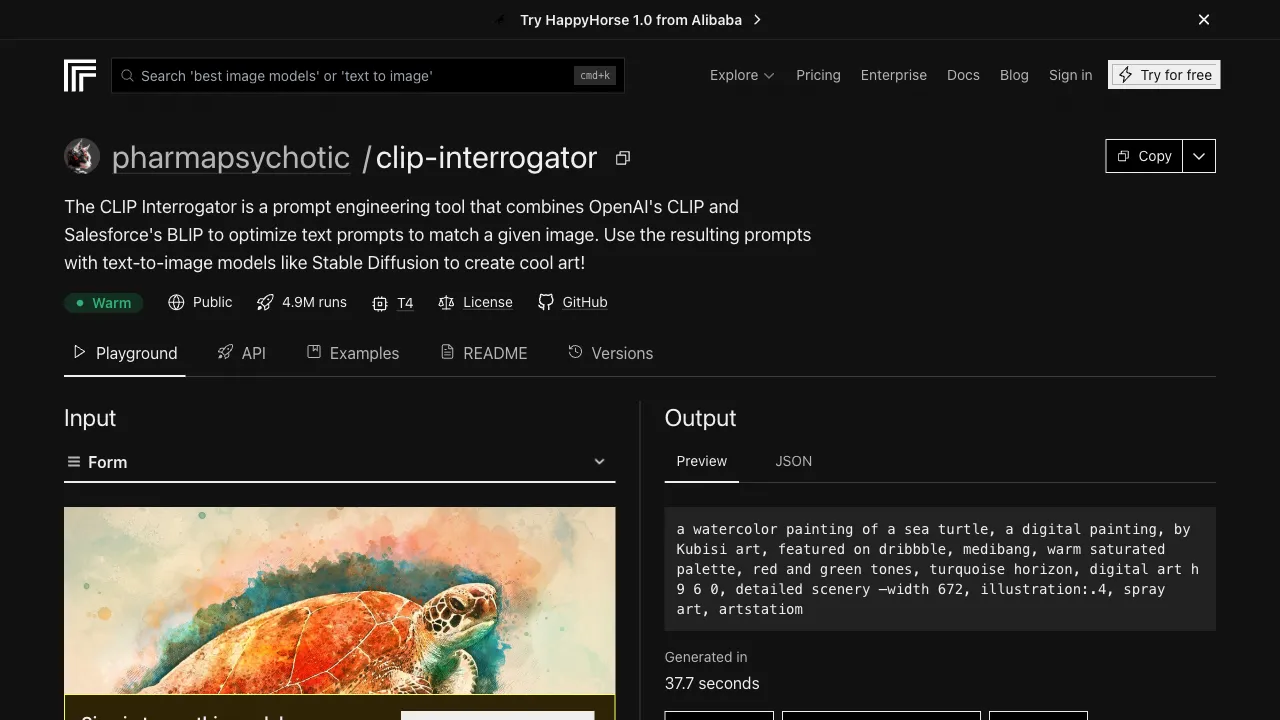
There is a classic dilemma in the AI art community: you see an impressive AI-generated image online, but you don’t know what prompt was used to create it. Or perhaps you have a reference image you like and want to generate similar-style images with AI, but you’re unsure how to describe that style. CLIP Interrogator is designed to solve this problem: you input an image, and it analyzes the visual content and style to output a descriptive prompt for that image.
What Is CLIP Interrogator?
CLIP Interrogator is an image reverse-engineering tool based on CLIP (Contrastive Language-Image Pre-training), a vision-language model developed by OpenAI. It does the opposite of AI image generation: while AI generation creates images from text, CLIP Interrogator infers text from images—analyzing the content, style, and visual features present in an image to generate corresponding descriptive prompts.
The original project was developed by pharmapsychotic and is open-sourced on GitHub. It can be used directly online via platforms like Hugging Face Spaces and Replicate without requiring local deployment.
How It Works
The CLIP model has learned from a vast amount of image-text pairs, allowing it to calculate the similarity between an image and various text descriptions. CLIP Interrogator leverages this capability: given an image, it searches through a massive keyword library (including artist names, style terms, photography terminology, quality descriptors, etc.) to find the combination that best matches the image, outputting a structured prompt.
The resulting prompt structure typically consists of a combination of subject description + style words + artist style + quality terms + technical parameters, which aligns closely with how prompts are written for Stable Diffusion.
Primary Use Cases
Reverse-engineering images you like This is the most common use case. You see an amazing AI-generated image on Civitai, ArtStation, or Pinterest and don’t know the prompt. You feed the image into CLIP Interrogator to analyze it, obtaining a descriptive prompt that you can use to generate similar-style images.
Note: The analysis result is not the "original prompt," but rather CLIP’s understanding and description of the image’s content. Using the analysis results to reproduce the original image will yield similar but not identical results, due to the inherent randomness of AI generation and the influence of different models and parameters.
Learning prompt structure For those looking to learn how to write better prompts, CLIP Interrogator serves as an excellent educational tool. Analyzing images of various styles and observing the structure of the outputted prompts helps you understand which types of vocabulary correspond to specific visual effects.
Identifying art styles by name You like a certain art style and can recognize it visually, but don’t know its name or the associated keywords. Upload an image in that style, and CLIP Interrogator’s output will typically include relevant artist names or style terms, helping you "identify" that style.
Assisting img2img prompts When performing img2img (image-to-image) in Stable Diffusion, you need to input a prompt describing the target direction. Using CLIP Interrogator to analyze a reference image and generate a prompt is a quick way to create img2img prompts.
Available Model Versions
CLIP Interrogator offers different model options that influence the focus of the analysis:
CLIP + BLIP: Combines CLIP’s style analysis with BLIP (Bootstrapping Language-Image Pre-training)’s content description, providing a more comprehensive output that describes both image content and style keywords.
CLIP only: Uses CLIP exclusively for analysis, producing more style- and artist-related vocabulary, suitable for scenarios where you want to extract style prompts.
Different versions focus on different aspects when analyzing the same image; try them all and compare the outputs to choose the most suitable one.
Actual Performance and Limitations
CLIP Interrogator’s analysis results are relatively accurate in identifying style vocabulary, particularly well-known artist styles, classic painting schools, and common image style terms (realistic, anime, watercolor, etc.), usually providing valuable reference words.
However, it has several obvious limitations:
Not always accurate: CLIP’s understanding is based on its training data. For uncommon styles or subtle variations in style, it may provide inaccurate or irrelevant vocabulary.
Keyword library can become outdated: The output depends on a preset keyword library. If new artists or style terms have not been added to the library, they will not appear in the output.
Cannot reconstruct the original prompt: This is a common misconception. CLIP Interrogator analyzes the visual content of an image; it does not know "what prompt was used to generate this image"—that information is invisible within the image itself. The analysis result and the original prompt are usually similar, but never identical.
Optimized for SD: The outputted prompt format is better suited for Stable Diffusion and may not fully apply to Midjourney’s prompt syntax.
Comparison with Other Tools
vs. Other Reverse-Prompt Tools: There are other tools with similar functions on the market, such as img2prompt and WD14-Tagger (specifically designed for tag extraction from anime images). CLIP Interrogator has an advantage in comprehensive style recognition, while WD14-Tagger is more accurate for extracting tags from anime images.
vs. Asking ChatGPT/Claude to Analyze Images Directly: Uploading an image to ChatGPT or Claude and asking it to "describe this image and recommend prompts for SD" works well in many cases, especially for describing image content. CLIP Interrogator’s advantage lies in its familiarity with the SD keyword system (particularly artist names and quality terms).
How to Use It
The most convenient way is to use it online via Hugging Face Spaces or Replicate. No complex account registration is required; simply upload an image to analyze it.
Replicate requires account registration and offers a free tier; the public version of Hugging Face Spaces may have queue wait times, so just be patient.
You can also clone the project to run locally. Users with Python and GPU capabilities will get faster response times.
CLIP Interrogator is a specialized tool in the AI art toolkit—not something you’ll use every day, but highly practical in specific scenarios like "I like the style of this image, and I want to recreate a similar effect." Learning to use it to analyze images you like is an effective path to improving your prompt engineering skills.