

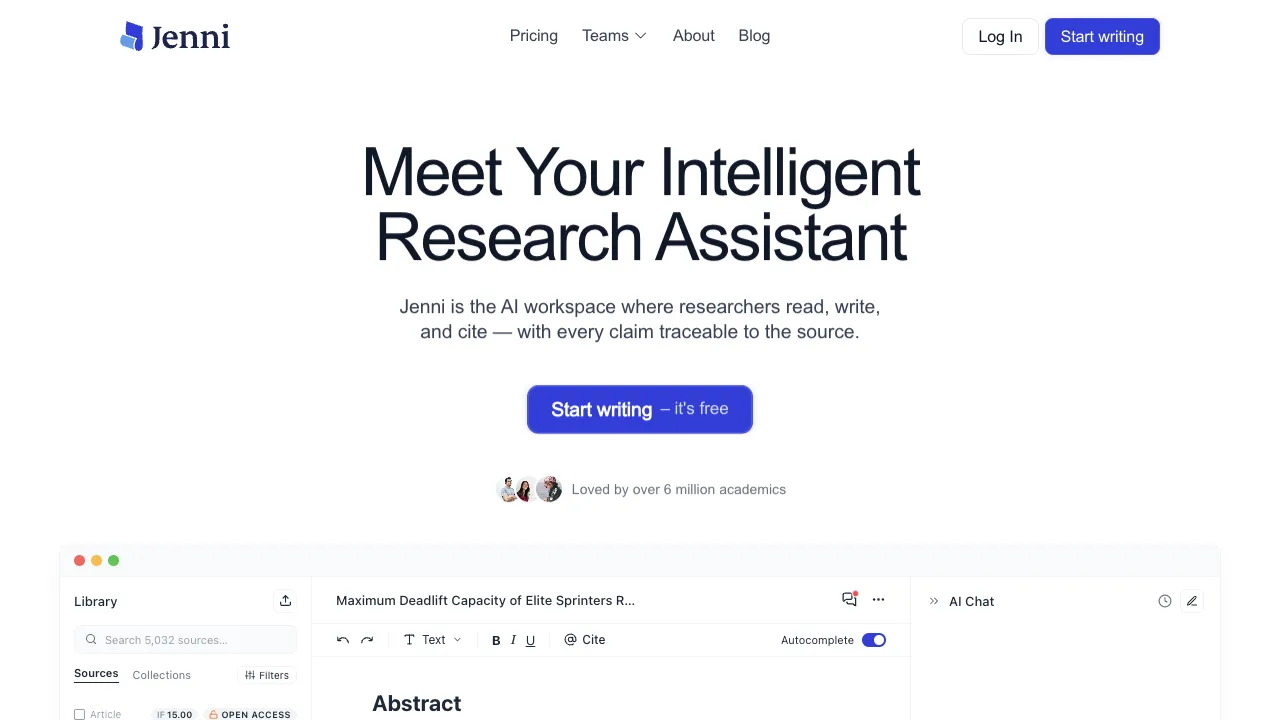
Academic writing comes with a unique set of pains: it’s not that you don’t know what to write, but rather that you stare at a blank page for ages before putting pen to paper; or that what you’ve already written feels insufficiently rigorous, leaving you unsure which sources to cite; or that you hit a wall halfway through, spending hours trying to figure out the next sentence. Jenni AI is designed specifically to address these pain points and has earned positive reviews from users in academic and professional writing circles as an AI writing assistant.
What Is Jenni AI?
Jenni AI is an AI writing assistant primarily aimed at researchers, students, academic writers, and professionals who need to produce high-quality text. It is not a tool that helps you "generate an article with one click," but rather an AI that collaborates with you in real time during the writing process, helping you flesh out ideas, improve expression, and find appropriate citations.
The product initially focused on academic writing scenarios, but in recent years has expanded to general writing scenarios such as blog posts, reports, and business documents. However, its core user base remains graduate students, PhD candidates, and students who need to write theses.
Core Features
AI Autocomplete
This is Jenni’s core experience: you type in the editor, stop at any point, press the Tab key, and the AI automatically continues writing the next content. If you like what it wrote, press Tab again to accept and continue; if not, ignore it and write it yourself.
This design seems simple, but the actual user experience is quite different from simply having the AI generate a whole paragraph of text—you remain in control of the writing rhythm, with the AI merely helping you "think of the next sentence." For those whose writing flow is generally smooth but who occasionally hit a wall, this approach feels more natural and easier to use directly than seeing a large block of AI-generated content.
Its completions are not random; they are generated based on the context and style of what you have already written, so the generated sentences usually align well with the preceding content.
AI Commands (/commands)
Typing "/" in the editor brings up a set of commands:
- /outline: Generates an article outline based on your topic
- /continue: Instructs the AI to continue expanding the current paragraph
- /rephrase: Rewrites the currently selected text, preserving meaning but changing expression
- /shorten / /expand: Shortens or expands the selected content
- /simplify: Simplifies complex expressions
- /cite: Inserts relevant citations (integrated with citation management features)
This command system covers the most common operations in the writing workflow. Triggering them via slash commands is much faster than opening a menu and clicking buttons, reducing friction during writing.
Citation and Reference Management
This is the key feature that distinguishes Jenni AI from many general-purpose writing AIs. It has built-in literature management capabilities:
You can upload PDF documents, and Jenni will read their content. You can then directly ask it to "quote a sentence from Section 3 of this paper," and it will generate content with correct citation markers. Supported citation formats include APA, MLA, Chicago, IEEE, and other academic standards.
For academic writing, this feature saves a significant amount of time—you no longer need to switch back and forth between Jenni and a reference manager; you can complete both writing and citation tasks within the same interface.
AI Search and Literature Discovery
Jenni integrates AI-driven academic literature search. While writing, you can search for relevant literature directly in the interface. The AI will recommend related papers, which you can add directly to your citation list.
While this feature is not as specialized as Elicit or Semantic Scholar, it is convenient for the workflow of "finding literature while writing," eliminating the need to switch windows.
Plagiarism Detection
Jenni includes a basic plagiarism detection feature that checks for overlaps between your written content and existing literature. This is a necessary function for academic papers and formal reports that require ensuring originality.
Editor Experience
Jenni’s editor is a clean, full-screen writing interface that excludes most distracting elements. Compared to Word or Google Docs, it is more focused: there are no excessive formatting toolbars; all features are triggered via keyboard shortcuts or slash commands.
Jenni offers continuation suggestions inside its writing editor. Accept a suggestion when useful or keep writing yourself; it suits revising as you write rather than generating an entire piece at once.
Finished content can be exported as Word, PDF, or Markdown files, facilitating direct submission or further processing.
Comparison with Other Writing AIs
vs ChatGPT / Claude: General-purpose AIs can help you write articles, but you need to repeatedly copy AI-generated content out, modify it, and paste it back in. Jenni embeds this process directly into the editor, reducing context switching. For those who frequently write academic content, this integration of workflow represents a tangible efficiency difference.
vs Grammarly: Grammarly focuses on grammar and style correction, serving as a tool to "check and improve existing content"; Jenni focuses on helping you generate content during the writing process, serving as a tool for "assistance while writing." The two can be used together; they are not substitutes for one another.
vs Paperpal: Both target academic writing. Paperpal focuses more on language optimization and academic standard checks for existing drafts; Jenni focuses more on AI collaboration during the writing process, helping you start from scratch.
vs Notion AI: Notion AI is stronger in note-taking and knowledge management scenarios, while Jenni is better suited for focused writing (especially academic writing) scenarios.
Who Is It For?
Graduate Students and PhD Candidates: For writing theses, literature reviews, and research reports, Jenni’s citation management and AI continuation features can significantly improve writing efficiency. Especially when you "can't go on," AI completion can help you break through the block.
Professionals Who Frequently Write Reports: Those who need to write analytical reports, market research, or business proposals will find that Jenni’s writing assistance reduces the time spent staring at a blank page.
Content Creators and Bloggers: For writing English blog posts, feature articles, and long-form deep-dive content, Jenni’s autocomplete and expansion features are well-suited to this scenario.
Non-Native English Writers: Jenni’s rephrasing and simplification features are valuable for writers whose native language is not English, helping make expressions more idiomatic and clear.
Pricing
- Free Plan: 200 words of AI generation per day; sufficient for trial but not for daily use
- Pro ($20/month or $12/month billed annually): Unlimited AI generation, full citation features, unlimited PDF uploads
- Unlimited ($29/month or $20/month billed annually): Higher limits and priority access
For students who use it seriously, the annual price of $12/month falls within a reasonable range for academic writing tools.
Limitations
Primarily optimized for English writing: Jenni’s AI training and optimization are heavily focused on English. Its performance in Chinese writing is noticeably weaker than in English contexts, offering limited value to users who primarily create content in Chinese.
No offline mode: All features require an active internet connection and cannot be used when offline.
AI-generated content requires verification: Especially regarding facts and citations, the AI may generate plausible-sounding but inaccurate information. Critical content must always be verified by the user.
Learning curve: Mastering slash commands and citation management takes some time; first-time users may need to spend several dozen minutes exploring the interface.
Usage Recommendations
Start with an outline: Use /outline to generate a framework for your article. Confirm the structure before writing content, which helps prevent writer’s block more effectively than diving straight in.
Use AI continuation in small batches: Avoid having the AI generate too much at once. Accept one or two sentences at a time via Tab to maintain control over the direction of your content.
Organize references in advance: Upload PDFs you intend to use to Jenni beforehand. When you reach a point requiring citation, you can retrieve them directly, significantly improving efficiency.
Perform a full proofread before exporting: Content co-written with AI may occasionally exhibit inconsistent tone or style. Read through everything once more before exporting to ensure uniformity.
Jenni AI is a mature product in terms of user experience design among academic writing AIs. For users who frequently write English academic content, it is worth trying its trial quota to see if real-time AI collaborative writing suits your workflow.