

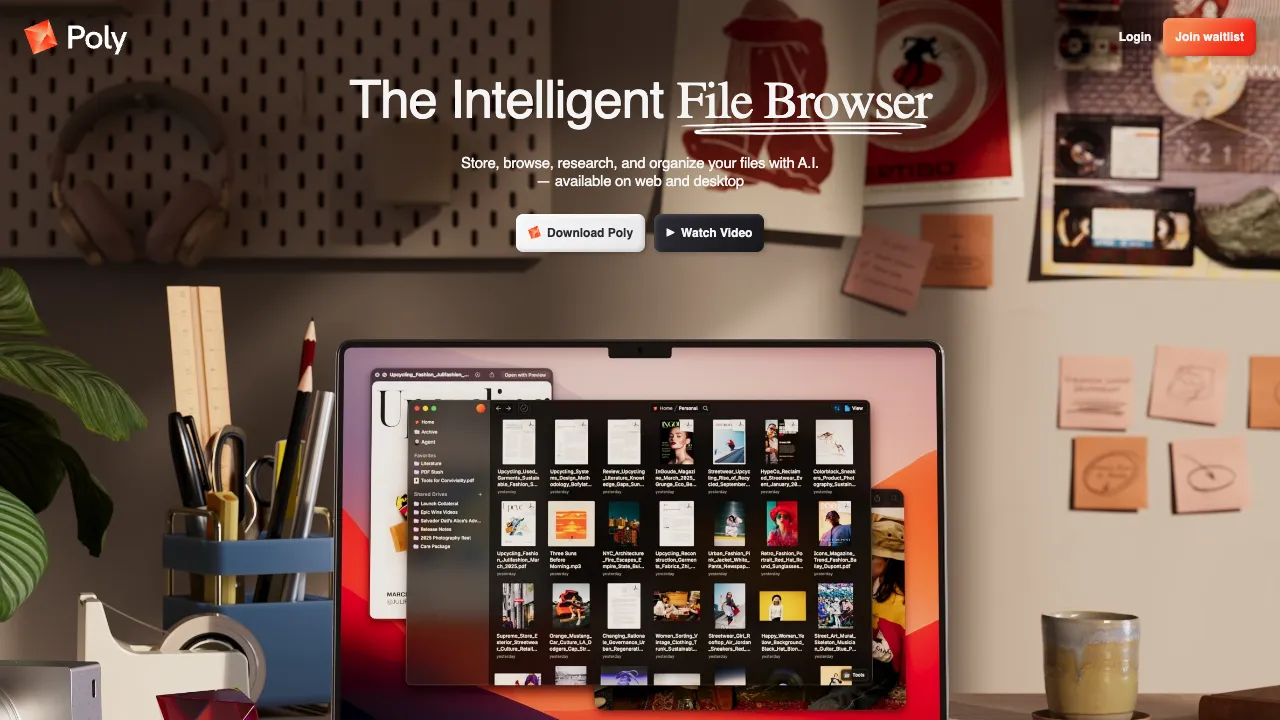
The product has pivoted. The old withpoly.com (text-to-3D textures) now redirects to poly.app, where the product is something entirely different — "Poly: The Intelligent Cloud File Browser", which stores, browses, researches and organises files with AI, searching by image, concept, phrase, colour and face, and even reaching specific passages inside files, on web and desktop. The page currently offers Join waitlist. The original 3D texture generation is no longer available here. The description below is kept as a record.
In 3D rendering and game development, materials are the key element that determines surface quality—the same model can appear as a gleaming gold statue or a rough, weathered stone simply by applying different materials. Creating high-quality materials requires multiple texture maps: albedo (color), normal, roughness, metalness, and more. Traditionally, producing these textures demanded professional software and specialized skills. Poly aims to simplify this process with AI: input a text description, and it generates a complete PBR material set directly.
What is Poly?
Poly (withpoly.com) is an AI-driven 3D material generation tool that allows users to generate PBR material maps for direct use in 3D rendering via text descriptions such as "rusty bronze iron plate," "moss-covered wet stone," or "smooth black carbon fiber."
PBR (Physically-Based Rendering) is the mainstream technical approach in modern 3D rendering. Major game engines (Unity, Unreal Engine) and rendering software (Blender, Cinema 4D) all adopt this system. PBR materials typically consist of multiple maps:
- Albedo (Color): The base color of the material
- Normal Map: Micro-surface bump details that create a sense of detail without increasing polygon count
- Roughness: Controls the ratio of diffuse to specular reflection
- Metalness: The metallic quality of the material
- Ambient Occlusion: Surface occlusion level, enhancing the sense of depth
Poly generates not just a single image, but a complete set of PBR maps that can be imported directly into these mainstream tools.
Core Features
Text-to-PBR Material Generation
Input a material description, and Poly’s AI generates the corresponding set of PBR material maps. This workflow compresses what used to take hours of parameter tweaking in Adobe Substance Designer into seconds of text input.
Inputs can be highly specific (e.g., "gray sandstone with green moss, wet surface, rough stone texture with visible cracks") or more general (e.g., "wooden floor"). The AI generates matching materials based on the description; more detailed descriptions typically yield results that better match expectations.
Seamless Tiling
The generated material maps support seamless tiling, which is crucial for applying materials to large areas in 3D environments—floors, walls, and ceilings require textures that repeat without visible seams. Poly’s generated maps automatically connect at the edges to ensure a natural tiling effect.
Material Library Browsing
Beyond generation, Poly offers a community material library (withpoly.com/browse/textures) featuring a large collection of user-generated and platform-curated materials. These can be previewed, and some downloaded directly. For users who prefer ready-made assets over generating from scratch, this is a valuable resource.
Material Adjustment and Variations
A single description can generate multiple variations. Users can select the most suitable one or further adjust parameters (such as color bias or roughness intensity) on a satisfactory result to fine-tune it to their liking.
Resolution Selection
Supports outputting at different resolutions, from 512×512 to 2048×2048. Higher-resolution maps offer richer details, suitable for close-up materials; lower-resolution maps generate faster, making them ideal for distant objects or performance-sensitive scenes.
Comparison with Other Material Tools
vs AmbientCG / Poly Haven (Free Material Libraries): These platforms are high-quality free PBR material libraries where assets are captured and created from real-world materials, offering very high quality. For common materials like concrete, wood, and metal, these free libraries are often sufficient or even superior. Poly’s advantage lies in custom descriptions—it can generate specific materials not found in any library, such as "alien metal with a blue sheen" or "old iron plate covered in scratches."
vs Adobe Substance 3D (Painter / Designer / Source): Substance provides material painting and parameter controls for projects that need detailed adjustments. It also requires learning the tools and paying for a subscription. Poly’s earlier AI texture generator focused on trying materials through text descriptions; the main differences are the controls and production workflow.
vs Ponzu: Ponzu is another tool for AI-generated seamless textures, with functionality highly overlapping with Poly. Differences mainly lie in the interface, subtle variations in generation quality, and pricing. Users can try both to compare.
vs Stable Diffusion + Seamless Processing: Using SD to generate images and then converting them into seamless textures via post-processing tools can yield more diverse material effects but involves more steps and a higher technical threshold. Poly offers a one-step, end-to-end workflow that is simpler and more convenient.
vs Midjourney for Texture Generation: Midjourney can generate images in various material styles, but it produces single images without the accompanying PBR maps (normal, roughness, etc.) required for 3D rendering. Additional processing is needed to make them usable. Poly outputs a complete PBR set directly, eliminating this extra step.
Who Should Use Poly?
Game Developers: Need large quantities of environmental materials (floors, walls, prop surfaces). Poly can quickly generate stylistically consistent materials based on the game’s worldview, saving time from piecing together free assets or creating them manually.
3D Architectural Visualization: Architectural renders require various building materials, from marble floors to brick facades. Poly can quickly customize material colors and styles according to design requirements.
Film and Animation Production: Quickly produce a batch of materials for concept validation phases to evaluate the overall visual style of a scene without waiting for professional material artists’ schedules.
Indie Game Developers: Independent teams without dedicated artists can use Poly to quickly fill in necessary materials, making the game world look populated and detailed.
3D Enthusiasts: Individuals working on personal projects in Blender who need various materials but don’t want to spend time creating them. Poly provides a convenient way to quickly acquire usable assets.
Pricing
The original text-to-3D-texture product is no longer offered.
What Poly became is an AI cloud file browser, currently at the waitlist stage with no published pricing tiers — you join a queue rather than sign up.
If what you wanted was the original capability (AI-generated 3D materials and seamless textures), current alternatives include Sloyd (from about $11/month on Plus, with unlimited generation and commercial rights) and Meshy.
Limitations
Occasional Deviation from Description: The AI does not always interpret text descriptions perfectly. Sometimes the generated material style may differ from expectations, requiring description adjustments or multiple generation attempts.
Limited Effectiveness for Complex Materials: For materials requiring specific patterns (tiles with specific geometric designs, materials with specific logos), AI generation is often inaccurate. Such needs still require manual creation with professional tools.
Quality Cannot Match Handcrafted Assets: While Poly’s generated materials are sufficient for most scenarios, there is a gap in detail richness and quality control compared to professionally crafted assets in Adobe Substance.
Network Dependency: As a cloud service, it requires an internet connection, unlike Substance Designer which can work offline.
Poly’s earlier texture generator was useful for trying materials during scene building. Results still need to be checked on the model under the intended lighting: seams, detail and the behavior of each PBR map affect whether a material is ready for the final scene.