

A common issue with AI image generation tools is that they produce bitmaps (PNG, JPG), while design workflows frequently require vector graphics—such as logos, icons, illustrations, and print materials. Bitmaps become blurry when scaled up, making them unsuitable for scenarios requiring resizing. Recraft specifically addresses this problem: it is one of the few AI image tools capable of directly generating editable vector files (SVG), while also supporting high-quality bitmap generation, covering a wide range of designer use cases.
What Is Recraft?
Recraft is an AI image generation tool distinguished by its ability to directly generate vector graphics in SVG format, making it ideal for designers creating icons, logos, illustrations, and graphic design assets. It also supports bitmap generation (including photorealistic images and digital art), offering a comprehensive feature set.
It has garnered significant attention within the designer community from 2024 through 2025, particularly in the niche of AI-generated vector graphics, where Recraft is considered one of the best tools currently available.
Core Features
Vector Art Generation
This is Recraft’s core differentiating feature. By entering a prompt and selecting a vector style, Recraft generates SVG-format vector graphics. These can be opened directly in design tools like Illustrator or Figma for node editing, color modification, and element adjustment—a capability that is quite rare among AI-generated images.
Style options for vector generation include:
- Icon: Suitable for app icons and UI icon design
- Flat: Clean, flat illustration style
- Line Art: Pure line-based sketch or technical illustration style
- Badge: Design elements such as labels, badges, and seals
For designers, the ability to directly generate editable vector assets saves significant time compared to generating an image that requires manual tracing.
Raster Art Generation
In addition to vectors, Recraft supports high-quality bitmap generation with the following style options:
- Photorealistic: Images with realistic photographic texture
- Digital Illustration: Fine digital painting style
- Concept Art: Suitable for games, film, and fantasy scenes
- Pixel Art: Retro 8-bit/16-bit game style
- Anime: Japanese anime illustration style
The style categories are clearly defined. Selecting a specific style category is far more accurate than describing the style via prompts.
Brand Style Consistency
Recraft features a "Brand Style" function that allows you to upload reference images. The system learns the visual style of these images, ensuring that subsequently generated content maintains a similar aesthetic. This is valuable for designers who need to batch-generate brand-consistent assets: once you establish a style reference, the visual feel remains consistent regardless of the content generated.
Background Removal
Upload an image and remove its background with one click to obtain an image with a transparent background. This is a common basic function that Recraft has integrated, allowing you to complete the workflow from generation to processing within a single tool.
Image Editing
For already generated or uploaded images, Recraft provides basic AI editing features: inpainting (modifying specific areas), outpainting (expanding the canvas), and more, covering common image processing needs.
Community and Asset Library
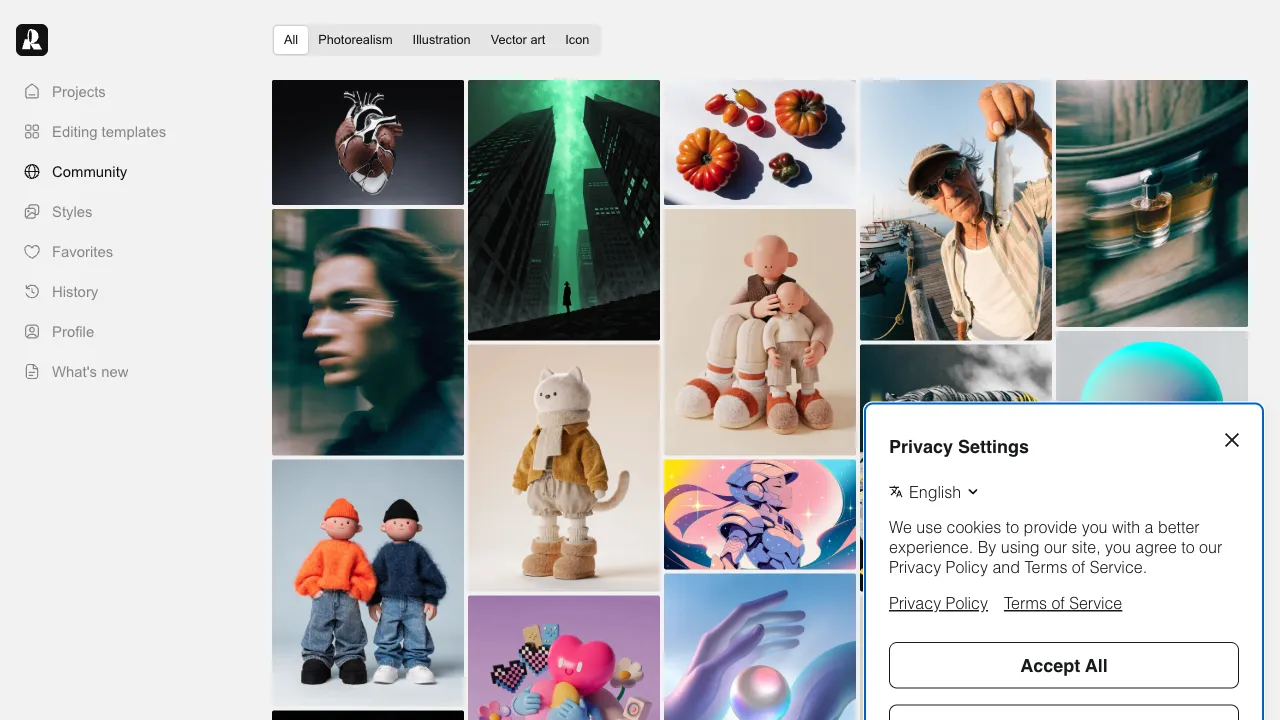
Recraft has an active community where users share their creations. You can browse excellent works in the community to understand others’ prompts and reference style directions. It also offers a library of ready-to-use AI-generated assets.
Why Vector Graphics Matter
In design work, vector graphics and bitmaps serve very different purposes:
Vector graphics are suitable for: Logos, icons, illustrations, print materials (business cards, posters), and elements that need to be used at various sizes—because vectors can be scaled infinitely without loss of quality.
Bitmaps are suitable for: Photos, complex digital paintings, and images requiring photographic texture—bitmaps become blurry when enlarged and are best suited for fixed-size applications.
Most AI generation tools only produce bitmaps. If you need vector assets, you must import the bitmap into Illustrator and use the "Image Trace" feature to convert it to vectors. This process loses detail and performs poorly on complex images. Recraft generates vectors directly, bypassing this conversion step and delivering a genuine improvement in workflow efficiency.
Comparison with Other Tools
vs Adobe Illustrator’s AI Features: Illustrator has AI generation features (such as Generative Recolor), but its capabilities are limited. Recraft offers greater freedom in vector generation.
vs Midjourney: Midjourney is one of the highest-quality AI image generation tools for artistic output, but it only produces bitmaps and does not support vectors. While Recraft’s artistic quality in bitmap generation may not match Midjourney’s, its vector generation capability is something Midjourney lacks.
vs Leonardo.ai: Leonardo is feature-rich with high-quality bitmap generation but does not support vector output. The two are competitors in the bitmap generation space; vectors are Recraft’s unique advantage.
vs Adobe Firefly: Firefly offers high image generation quality and good copyright compliance (commercial safety), but has limited vector support. Recraft is more specialized in the vector domain.
vs Canva (Built-in AI): Canva’s AI features target non-design professionals with simple operations but low controllability. Recraft targets users with some design experience, offering finer control.
Who Should Use Recraft?
UI/UX Designers: Those who need large quantities of icons and UI illustration assets will find that Recraft generates SVG files that can be edited directly in Figma, significantly reducing the time spent manually drawing icons.
Illustrators and Graphic Designers: Those needing vector illustration assets can use Recraft to generate base versions, which can then be refined in Illustrator. This is far more efficient than starting from scratch.
Brand Designers: Those who need to generate brand-consistent graphic assets can use Recraft’s Brand Style feature to maintain visual consistency.
Print Designers: Print workflows require vector files to ensure high-quality output. Recraft’s direct vector output addresses this real need.
Developers Needing Icon Assets: Developers building apps or websites who need custom icons but lack Illustrator skills can use Recraft to generate SVG icons for direct use in their projects.
Pricing
Recraft offers a fairly generous free plan:
- Free tier: A daily allocation of generation credits for both vector and bitmap outputs, with access to basic features.
- Paid tiers (approx. $12–20/month): Increased generation limits, commercial usage rights, and higher priority processing.
For most designers, the free tier’s quota is sufficient for daily trial use; consider upgrading only after confirming it meets your specific needs.
Practical Advice
Keep vector prompts concise and clear: AI-generated vectors struggle with complex descriptions. Keep prompts simple, focusing on shape, style, and intended use rather than over-describing details (which can be handled via the vector’s editability).
Use Style Reference to build a brand style set: If you need a series of consistent assets (such as a set of icons or a series of brand illustrations), upload a few reference images first to establish the style before batch generating. This significantly improves consistency across results.
Refine generated vectors in Illustrator: SVGs from Recraft often require secondary editing in Illustrator—removing unnecessary nodes, simplifying paths, and adjusting colors. Treat these outputs as “drafts” rather than final, ready-to-use assets.
Explore styles using bitmap generation first: Use bitmap generation to quickly explore multiple style directions. Once you’ve selected a satisfactory style, switch to vector mode for generation. This approach is faster and prevents wasting time exploring styles directly in vector mode.
Recraft is currently the most recommended tool in the niche of AI-generated vectors. For designers who need vector assets within their workflow, it fills a gap left by other AI tools.