

Adding voiceovers to videos has long been a dilemma: recording it yourself requires suitable equipment and environment, plus a voice that doesn’t make you cringe; hiring professional voice actors yields high quality but at a steep price, with several minutes of script often costing hundreds of dollars; while cheap robotic voices sound like 1990s phone prompts, using them in content actually lowers its perceived value.
TTSMAKER is a tool that breaks this deadlock. It is an online TTS platform whose voice synthesis quality ranks among the top tier for free tools, supporting over 100 languages, completely free, and usable without registration. In the toolkit of many video creators, TTSMAKER is the go-to choice for the voiceover step.
What is TTSMAKER?
TTSMAKER (ttsmaker.cn) is an online Text-to-Speech (TTS) tool that converts input text into audio speech, supporting downloads in common formats like MP3, which can be directly imported into video editing software or audio projects for use.
Its core value lies in satisfying three conditions simultaneously: completely free, sufficient quality, and extremely simple operation. Lacking any one of these would significantly reduce the tool’s practicality. Many free TTS tools have poor quality, high-quality tools require payment, and reasonably priced tools often have complex operations. The balance TTSMAKER strikes across these three points is why it continues to be recommended.
Feature Breakdown
Core Text-to-Speech Functionality
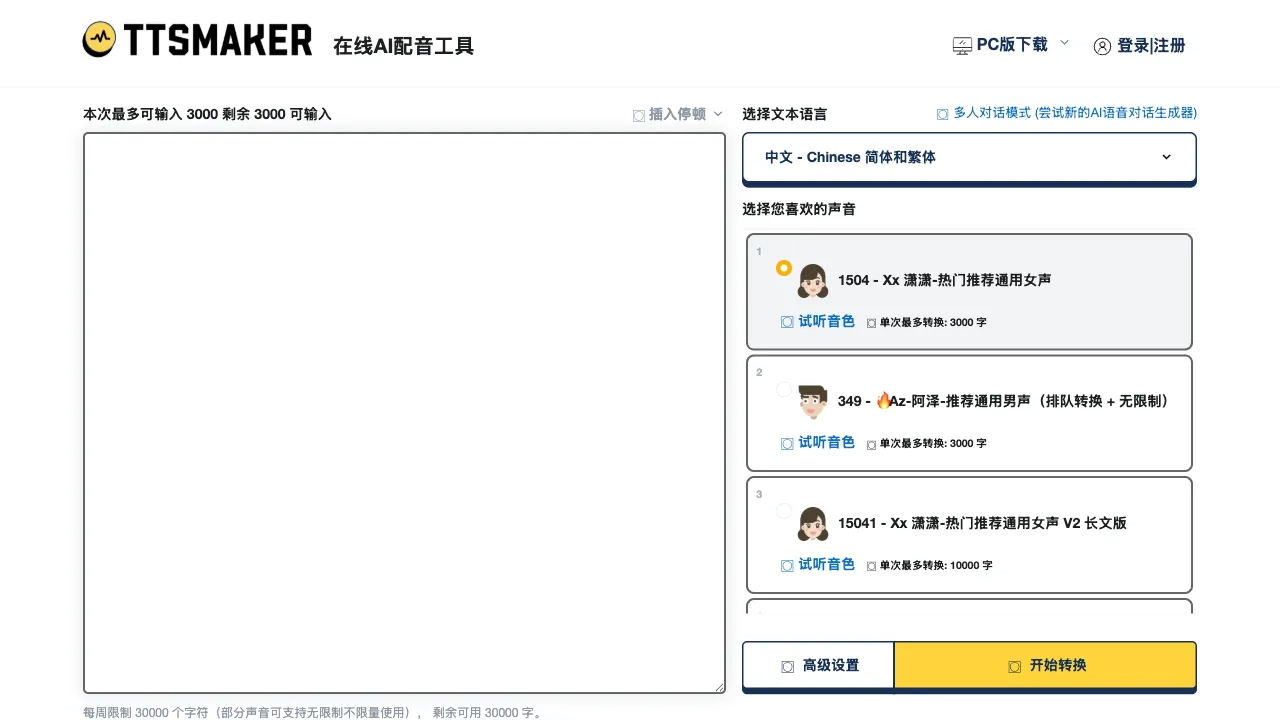
The workflow is very simple: paste text into the input box, select language and voice, click generate, wait a few seconds, and download the audio file. The entire process requires no account registration, no password memorization, and works directly from the webpage.
The generation quality is TTSMAKER’s most notable feature. It leverages the TTS APIs of mainstream cloud providers like Microsoft, Amazon, and Google. These cloud services have mature voice synthesis technology, with naturalness, pronunciation accuracy, and intonation rhythm all reaching commercial usability standards. What you hear is not the distinctly electronic robotic sound of early systems, but relatively fluent and natural speech with basic naturalness in pauses and intonation.
The quality for Mandarin Chinese is relatively good—clear pronunciation, no obvious accent, and reasonable sentence segmentation for long sentences, meeting the needs of most video voiceovers. Cantonese and some dialects are also supported, but quality varies; it is recommended to test them before use.
Multi-language and Voice Selection
Supports over 100 languages, covering major market languages—Chinese (Mandarin, Cantonese), English (US, UK), Japanese, Korean, French, German, Spanish, Portuguese, Arabic, Hindi, and more.
Each language typically offers multiple voices, covering different genders (male/female) and styles (formal/lively/gentle/news broadcast, etc.). Each voice can be previewed before selection, allowing you to choose the one that fits your content style before generating, avoiding the hassle of regenerating because the voice didn’t fit.
For content requiring multi-language versions—such as a video series released in both Chinese and English—TTSMAKER allows generating voiceovers for both languages on the same platform, unifying the workflow.
Speed and Pitch Adjustment
Speed is adjustable: slow speed suits tutorial explanations and children’s content; normal speed fits most daily content; fast speed suits short broadcasts or content requiring rhythm.
Pitch (intonation) can also be fine-tuned to adjust high/low tones on the base timbre, making the voice better match the emotional tone of the content.
Adjusting these parameters requires no professional audio knowledge; just drag the sliders, preview the effect, and stop when satisfied.
Text Length and Batch Processing
The free version has a limit on text length per generation, usually around 5,000 characters (subject to the current official website). For typical video voiceovers, a script for one video is usually 1,000–3,000 characters, which can be handled in one go.
If the text is longer, you can generate multiple audio files in segments and splice them together in video editing software. This operation is slightly cumbersome but not a major issue for users who occasionally need to process long texts.
Download Formats
Generated audio can be downloaded as MP3 files, directly imported into video editing tools like Premiere, DaVinci Resolve, Jianying (CapCut), or CapCut, or into audio editing software like Audacity for further processing.
Comparison with Competitors
vs Xunfei Voice: iFlytek’s voice synthesis technology is top-tier in China, especially for emotional voices and multi-character dubbing, offering higher quality; however, free usage limits are strict, and some high-quality voices require payment. TTSMAKER offers a higher degree of freedom regarding cost, with slightly lower quality that is sufficient for most scenarios.
vs Microsoft Azure TTS (Edge Read Aloud): The read-aloud feature in the Edge browser uses Microsoft Azure TTS underneath, offering excellent voice quality and high naturalness for Chinese pronunciation; however, it is a built-in browser function that cannot batch-generate audio files or download them as independent files. TTSMAKER’s value lies in its ability to download audio files, making it suitable for scenarios requiring audio export.
vs ElevenLabs: ElevenLabs is one of the tools with the highest English voice synthesis quality currently available, supporting voice cloning (training an AI version of your voice using a few minutes of recording), with extremely natural voices that include emotional and intonation variations; the free version has strict limits (about 10,000 characters per month), and normal use requires a paid subscription (starting around $5/month). TTSMAKER has a quality gap but is completely free, making it a more practical choice for users who don’t need voice cloning and have limited budgets.
vs Tencent Cloud/Alibaba Cloud TTS API: The TTS APIs from these cloud providers are top-tier in quality, with very natural voices and enterprise-grade stability; however, they require registering cloud accounts, technical integration, and pay-per-use pricing, making them not directly usable tools for ordinary users. TTSMAKER encapsulates these APIs into a web tool for ordinary users, lowering the technical barrier.
vs Murf / Speechify: These specialized AI dubbing platforms offer richer features, including background music, multi-character switching, and demo video creation; however, they basically require paid subscriptions. TTSMAKER offers more basic functionality but has a clear advantage in being free.
vs Jianying’s (CapCut) AI Voiceover Feature: Jianying has built-in AI voiceover features that can be called directly within video editing, offering a seamless workflow; it has rich voice options and good quality. For users editing videos in Jianying, using Jianying’s voiceover directly is more convenient. TTSMAKER’s advantage is that it doesn’t depend on specific video editing software, generating independent audio files that can be imported into any editing tool.
Who Should Use TTSMAKER?
Bilibili and YouTube Video Creators: Tutorial and knowledge-sharing videos need voiceovers without the creator appearing on camera or dealing with unstable recording quality. The voiceovers generated by TTSMAKER are clear and professional enough that viewers won’t perceive them as cheap when placed in videos.
PPT Presentation Production: Adding voice narration to presentation PPTs; while screen-recording for demonstration, AI voiceover narration can be used. TTSMAKER’s audio can be directly imported into PowerPoint slide audio or used in conjunction with screen recording.
Audiobook Production: Converting articles or blog content into audio versions for users to listen to during commutes or workouts. For entry-level podcast production, TTSMAKER is the lowest-cost starting point.
Educational Content Production: Teachers recording instructional videos and creating audio learning materials; language learning content requires standard pronunciation demonstrations (TTSMAKER’s support for US/UK English is practically valuable in this scenario).
Product Demos and Internal Training: For software product demo videos and internal company training materials that need voiceover narration but don’t warrant hiring a professional voice actor, TTSMAKER is a time- and cost-saving solution.
Multi-language Content Global Expansion: When one piece of content needs to be released with voiceovers in multiple languages like Chinese, English, and Japanese, TTSMAKER’s multi-language support allows handling all languages on one platform, eliminating the need to find corresponding dubbing tools for each language.
Game Development and Indie Developers: Indie games often need NPC dialogue voiceovers but lack a dubbing budget; TTSMAKER is a low-cost prototype voiceover solution. While final release may require real human voiceovers, using AI voiceovers for testing during the development phase is a reasonable temporary solution.
Usage Tips
Before formally generating long text, test the selected voice effect with a few sentences first—confirm that speed, intonation, and overall feel meet expectations before generating the full script. This avoids the situation where you finish generating long text only to find the voice unsuitable, requiring you to reselect the voice and regenerate.
For content with specific pause requirements, you can add punctuation marks in the text to control pauses—commas, periods, and ellipses will produce pauses of different lengths in TTS. If a noticeable pause is needed at a certain spot, add a period there or manually insert an empty line.
If the generated audio has individual pronunciation issues, you can regenerate just the problematic part separately and replace the corresponding segment in your audio editing software, without needing to regenerate the entire section.
Limitations
A common limitation of TTS technology: AI-generated speech has a ceiling in emotional expression. For content requiring rich emotional changes—storytelling, emotional videos, or content needing emphasis and tone shifts—AI voiceovers lack the expressiveness of human voice actors. The more the content needs to "act" out its feeling, the more obvious the limitations of AI voiceovers become.
The free version has a character limit per generation, requiring long texts to be processed in segments. During peak hours, there may be queueing delays, making generation speed unstable.
Quality for some languages (especially minor languages and dialects) varies; it is recommended to thoroughly test them before use.
Pricing
TTSMAKER’s core features are completely free, requiring no account registration—just open the site and start using it. The free tier imposes limits on characters per generation and daily usage, which is typically sufficient for light personal use.
Registering an account (free of charge) usually unlocks higher character limits and more daily generations. Whether a paid tier exists, and what specific feature differences apply, are subject to the current information on the official website.
TTSMAKER is one of those tools that makes you wonder, “How can this be free?” The quality justifies its free status, the interface is so simple there’s no learning curve, and it covers a wide range of use cases. It offers practical value for video creators, content producers, and educators alike. Bookmark it now so you can open it directly whenever you need voiceover next time.