

Not everyone who needs to design has the time to learn Photoshop, nor is every design need worth the cost of hiring a professional designer. Chuangkit began tackling this problem in 2014: enabling ordinary people to create decent graphic designs. Ten years later, with AI becoming the new capability layer, Chuangkit’s AI features have further accelerated the process from “zero to one image.”
What is Chuangkit?
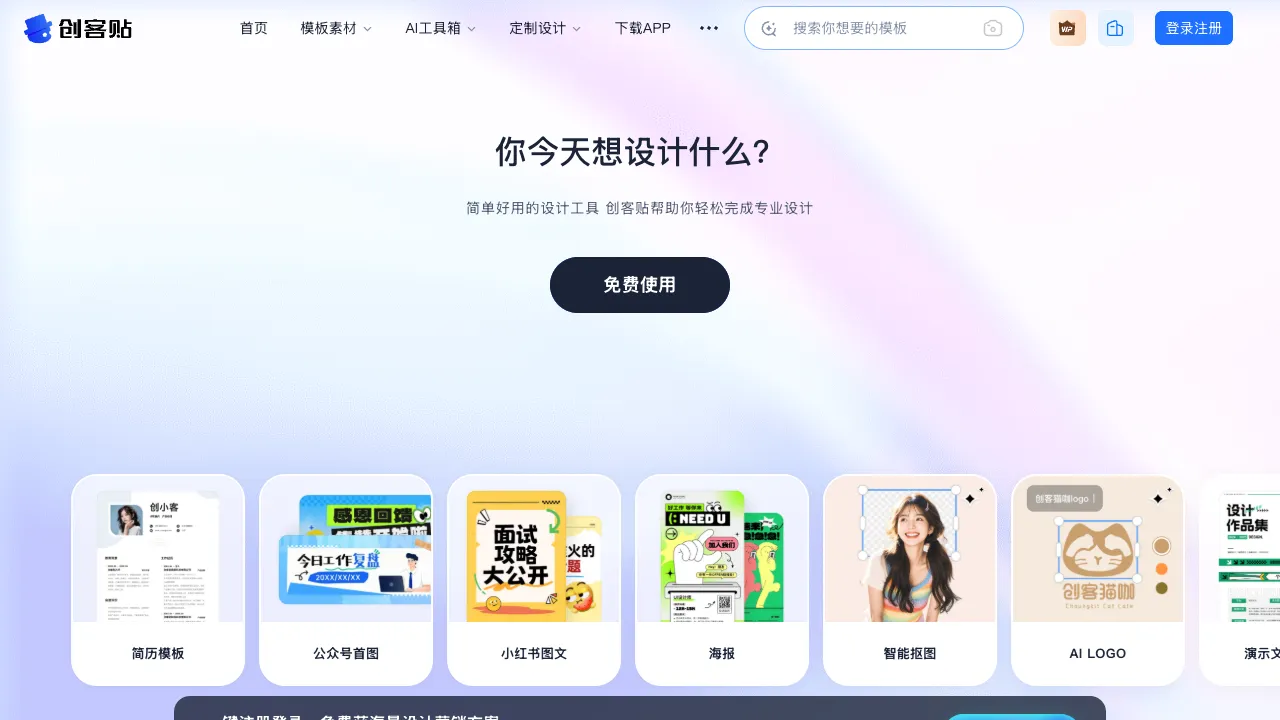
Chuangkit (chuangkit.com) is an online graphic design tool aimed at individual users and small-to-medium enterprises in China, providing template-driven design functionality. The covered design scenarios include social media graphics, event posters, business cards, PPTs, e-commerce main images, and corporate promotional materials.
Its core positioning is clear: enabling non-designers to create designs. AI features added in recent years have further reinforced this direction—not just modifying templates, but generating design content through text descriptions.
Among domestic online design tools, Chuangkit’s direct competitors are Meitu Design Studio (Meitu Shejishi) and Gaoding Design. All three are competing for the same market: users who need to produce images quickly but lack professional design skills.
AI Features
AI Text-to-Image Generation
Chuangkit’s AI text-to-image feature allows you to input a description and generate image assets ready for use in designs. Unlike standalone AI painting tools, Chuangkit integrates this function into the entire design workflow—after generating an image, you can adjust it directly on the canvas, add text, and combine it with other elements without switching applications.
For situations where you can’t find suitable images while creating posters or cover art, this feature can quickly supplement assets. Although precision may not be perfect, it is sufficient for many lightweight scenarios.
AI One-Click Design Generation
This is a key feature Chuangkit has recently launched: input a theme or simple description, and the AI automatically generates a complete design scheme, including background, layout, and text styles. Users then adjust this output rather than starting from a template.
This feature is helpful for users who have a clear theme but don’t know where to start. Although the initial generated scheme may not be perfect, it provides an iterative starting point.
AI Cutout and Image Processing
It includes built-in AI cutout functionality that removes image backgrounds with one click, suitable for creating effects where people or products appear “floating” on the design. The edge processing quality is adequate for common scenarios, though complex edges like hair strands are relatively harder to handle.
Smart Layout Suggestions
During the design process, the AI provides optimization suggestions for text layout, such as font pairing, line spacing adjustments, and color contrast, helping users without design experience avoid some common layout issues.
Template Library
One of Chuangkit’s core assets is its template library, which covers:
- Social Media: WeChat Official Account cover/body images, Weibo graphics, Xiaohongshu (Little Red Book) covers, Douyin (TikTok) covers, Bilibili covers
- Event Marketing: Event posters, holiday greetings, promotional images, invitations
- Business Materials: Business cards, corporate brochures, product manuals, display stands
- Workplace & Office: Resumes, PPT covers, report covers, organizational charts
- E-commerce: Product main images, detail page assets, store decoration graphics
Template updates follow holidays and trending topics. Specialized templates are updated during key time nodes such as Spring Festival, Double 11 (Singles’ Day), and Valentine’s Day, which is important for operations staff who need to keep pace with these timelines.
Comparison with Similar Tools
vs Canva: Globally, Canva has an advantage in template quality and quantity, its AI features (Magic Studio) are rapidly improving, and it boasts a massive resource library for English content. Chuangkit’s advantages lie in stable access speeds within China, more comprehensive Chinese fonts, and localized templates (holidays, Chinese style) that better fit domestic usage habits. If your content targets a domestic audience, trying both before deciding is worthwhile.
vs Meitu Design Studio: The two have highly overlapping positioning as domestic template design tools. Meitu Design Studio leverages Meitu’s accumulated image processing technology, potentially offering more mature AI cutout and image beautification features; Chuangkit has its own accumulation in the template library and commercial materials direction. Which is better often depends on specific scenarios and personal preference.
vs Gaoding Design: Gaoding has distinctive templates for video covers and short-video scenarios, while Chuangkit leans more toward graphic design.
vs Local Photoshop: The ceiling for PS is far higher than Chuangkit’s, but the learning cost and usage complexity are also much greater. Chuangkit offers “70 points, fast output,” while PS offers “100 points, requiring skill investment.” They serve different scenarios and are not substitutes for each other.
Who Should Use Chuangkit?
Operations and Marketing Staff: For those who need to produce large volumes of various graphics and posters weekly, Chuangkit’s template library can significantly reduce time spent designing from scratch, and its AI features further accelerate the asset generation process.
Individual Content Creators: Personal creators on Xiaohongshu, Weibo, and WeChat Official Accounts who need visually appealing graphics but do not want to learn professional design software will find Chuangkit to be one of the lowest-barrier options.
Small and Medium Enterprises (SMEs): Small companies without dedicated designers can use Chuangkit’s commercial templates to quickly meet basic needs for various promotional materials.
Startup Teams: In the early stages, when needing to rapidly produce various materials, it is not worth investing too many resources in design during the validation phase; Chuangkit is a high cost-performance choice.
Pricing
Chuangkit offers both free and paid versions (Chuangkit Professional). The free version provides basic templates and features, while some advanced templates and AI functions have watermarks or usage limits. The paid version unlocks all templates, AI function quotas, watermark-free downloads, etc. Specific prices are subject to the official website.
The free version is suitable for occasional use or testing scenarios. For frequent users or those with commercial needs, the cost-performance of the paid version is usually reasonable.
Among domestic online design tools, Chuangkit belongs to the category of fully functional and low-barrier options. The addition of AI features has brought new improvements in asset generation and design startup speed. For users who do not want to learn professional design software but need to continuously produce images, it is a choice worth adding to your toolkit.