

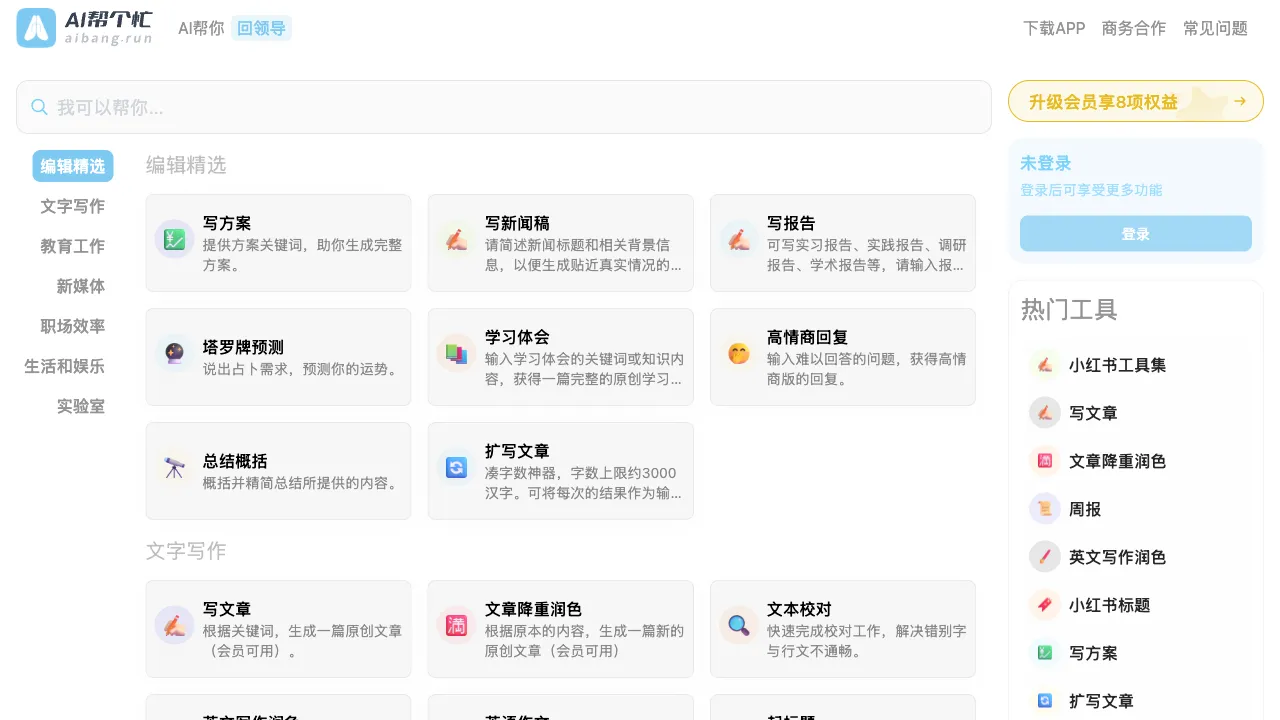
The ecosystem of AI tools is far richer than we imagine. Beyond the household names like ChatGPT and Midjourney, there are countless small utilities, each tackling a very specific problem—converting text to speech, swapping backgrounds for your images, extracting tables from screenshots into Excel spreadsheets... Individually, these tools may seem modest, but together they can eliminate repetitive, time-consuming tasks in daily work. AI Help Me Out is exactly such a collection of utilities.
What Is AI Help Me Out?
AI Help Me Out (aibang.run) is a platform aggregating over 20 practical AI tools, launched by the domestic design media UISDC. The platform's positioning is "practical for daily use"—it doesn't chase cutting-edge technology but focuses on scenarios ordinary people encounter every day.
Unlike an AI tool directory site that merely aggregates links, AI Help Me Out integrates its tools directly into the platform. Users don't need to register multiple accounts or jump between different websites; simply open the platform and start using it immediately for a smoother overall experience.
What Tools Are on the Platform?
Image Processing Category
AI Background Removal: Upload an image, remove the background with one click—ideal for product photos, ID portraits, social media avatars, etc. These tools typically call APIs like remove.bg or similar ones; results are quite good for common scenarios (people, objects).
Image Super-Resolution: Upscale low-resolution images while adding detail, suitable for old photographs, screenshots, and blurry reference materials.
Image Styling: Convert ordinary photos into different artistic styles, such as oil painting, watercolor, cartoon, etc.
AI Face Swap / Background Replacement: Ideal for quickly creating social media content or changing the background color of ID portraits.
Text Processing Tools
AI Writing Assistant: Enter a topic or keywords, and the AI generates article drafts, social media copy, product descriptions, and more.
Text Translation: Supports Chinese-English mutual translation and multi-language conversion, ideal for quickly processing short texts.
AI Article Polishing: Input your finished draft, and the AI refines it to be smoother with a more natural tone.
Copy Generation: A text generation function specifically optimized for scenarios such as e-commerce copy, Moments posts (WeChat), slogans, and advertisements.
Audio & Video Tools
Text-to-Speech (TTS): Converts written content into audio files, supporting multiple voice options; suitable for creating audiobooks or video dubbing.
Video Subtitle Extraction: Upload a video file, and the AI automatically identifies spoken content to generate subtitle files.
Data Processing Tools
Image Text Recognition (OCR): Extracts text from images, supporting both Chinese and English; ideal for processing screenshots and scanned documents.
PDF Parsing: Upload a PDF file to extract its textual content or summarize its main points.
Design Assistance Tools
Color Scheme Generation: Input a description or reference colors to generate matching schemes and palettes.
Font Recommendations: Recommends suitable font combinations based on scenario descriptions.
The Value of This Tool Collection
Looking at these features individually, you can find specialized tools for each one: remove.bg for background removal, ElevenLabs for voice conversion, DeepL for translation—each tool used alone is more powerful. The value of AI do me a favor (AI Bang Ge Mang) does not lie in having the strongest feature in every category; rather, it lies in:
Zero Barrier to Entry: No account registration required and no need to enter credit card information—you can use it immediately upon opening. This low barrier is very friendly for users who occasionally need a specific function but don't want to register multiple accounts.
Centralized Hub: Remember one URL, and you have access to over 20 functions within; there's no need to memorize or search for various tool URLs.
Chinese Optimization: The platform is entirely oriented toward Chinese-speaking users, with an interface in Chinese that offers targeted optimizations for processing Chinese content—unlike many foreign tools where you must switch languages manually.
Lightweight: These tools require no learning curve; they are ready to use immediately upon entry, making them ideal for scenarios like "I just need this function occasionally."
Comparison with Similar Platforms
vs Tool-Specific AI Applications (remove.bg, ElevenLabs): Specialized tools excel in their respective domains with more powerful features but require multiple accounts and learning different interfaces. AI do me a favor follows a "good enough" approach.
vs AI Directories (such as AIbase, futurepedia): Directories aggregate links, requiring users to jump between various tool websites; AI do me a favor integrates directly for click-and-use functionality, offering a more seamless experience.
vs All-in-One Toolbox Apps (many available domestically): While mobile apps offer similar feature collections following this route, AI do me a favor is web-based—no app installation needed—and works instantly via QR code or link scan, providing smoother usage on PC.
vs ChatGPT: ChatGPT can complete many text-processing tasks but cannot handle specific functions like image background removal or TTS (Text-to-Speech). The advantage of AI do me a favor lies in its specialized optimization for concrete tasks; it doesn't require describing needs via natural language—just click to execute.
Who Should Use AI do me a favor
Casual Users Unfamiliar with AI Tools: Individuals who occasionally need a specific AI function but don't want to register accounts or learn complex tools will find the zero-barrier entry of AI do me a favor very welcoming.
Content Creators: Self-media creators frequently needing image processing (background removal, style transfer), text editing (revisions, copywriting), and voiceovers (TTS) can use AI do me a favor as a shortcut tool within their workflow.
Small Team Operations Staff: E-commerce or social media operations requiring heavy daily content production will save significant repetitive labor through features like batch image processing, copy generation, and OCR in AI do me a favor.
Designers' Auxiliary Tools: Designers won't use it as primary software but can handle certain fragmented tasks (quick background removal, color scheme references) here faster than opening professional applications.
AI Tool Beginners: Those wanting to understand what AI tools can do but unsure where to start will find the feature collection in AI do me a favor an excellent "window into AI capabilities," allowing them to quickly learn specific things AI can currently help with.
Important Considerations
Tool collections like this share a common limitation: features are "good enough" but typically not "the best." If you require high-quality voice synthesis, dedicated ElevenLabs yields better results; for complex image processing, Photoshop or professional AI tools remain more reliable. AI do me a favor suits usage scenarios prioritizing convenience with an "if it works well enough" mindset rather than professional contexts demanding extremely high quality standards.
Additionally, as an aggregation platform, some functions rely on third-party APIs and may be subject to usage limits or service stability issues; heavy users might need to consider whether subscribing directly to specialized tools is worthwhile.
AI do me a favor represents one direction of "democratizing AI tools"—reaching ordinary users with the practical value of AI at the lowest possible barrier. For those already being power users across various AI tools, its value may be limited; however, for regular users just beginning to explore AI capabilities and wanting to understand what AI can do, it serves as a friendly entry point.