

On the path to mastery for Midjourney users lies an invisible wall of knowledge: style vocabulary. You have a clear visual image in your mind—"that grainy texture of old film" or "the geometric vibe of a Bauhaus poster"—but when writing prompts, you can only dryly type "vintage style," resulting in images that are worlds apart from your imagination. The gap between experts and novices lies largely not in creativity, but in the fact that experts know which word to use for "duotone Risograph print feel" and which artist’s name summons what kind of light.
This vocabulary used to be accumulated only through thousands of attempts burning through credits. Midlibrary has turned it into a public library—over 5,000 style entries, each with tested visual examples, revered as the standard reference by the global MJ community and even recommended by Midjourney itself.
What is Midlibrary?
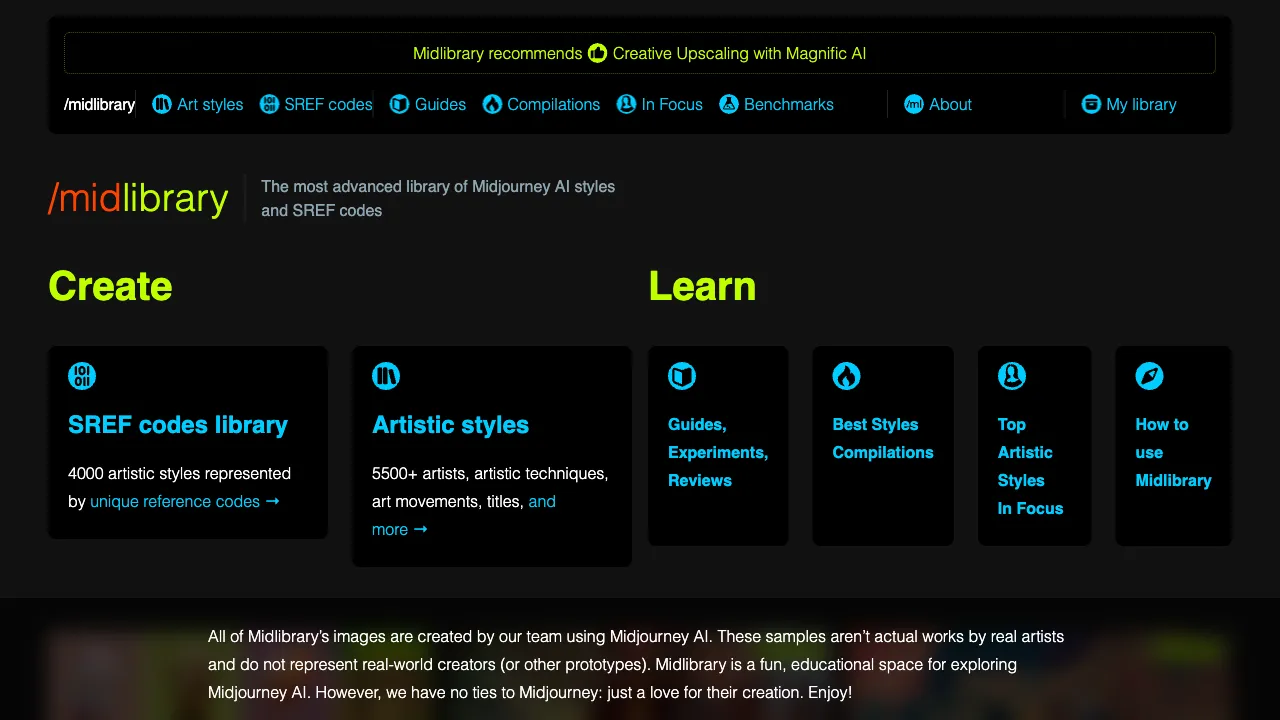
Midlibrary (midlibrary.io) is a Midjourney style resource library created by Georgian designer Andrei Kovalev. It systematically catalogs the actual generation effects of thousands of style keywords, artist names, and technique terms in MJ, with each entry accompanied by multiple tested sample images and copy-paste-ready keywords.
Its essence is a bilingual dictionary of visual styles: on one side are the vocabulary words of human art history and design language (Impressionism, Risograph, Tyndall effect); on the other is what these words actually "look like" in Midjourney. Users don’t need to understand art history—just look at the images, select what you want, copy the keywords, and you’re done.
Content Structure
Artist Style Library: The Crown Jewel
Effect references organized by artist name, ranging from classical masters (Monet, Hokusai, Mucha) to contemporary visual artists, each with generated samples under uniform testing conditions. "Summoning an artist" in MJ is one of the most powerful style control methods, but which names work and what they look like used to rely entirely on word-of-mouth—Midlibrary lays out thousands of tested results for you to see.
The site marks ethical questions around living-artist entries and tracks Midjourney policy changes for some artist names. Read those notes alongside the style examples.
Art Movements and Genres
Impressionism, Surrealism, Bauhaus, Memphis Design, Vaporwave... The actual effects of each genre term are clear at a glance. This section doubles as a "visual crash course in art history," with many users completing a round of aesthetic education just by browsing.
Photography and Cinematic Language
Film stock feels (Kodachrome, Polaroid), lens language (fisheye, tilt-shift), lighting terminology (Rembrandt lighting, neon light), film color grading styles—translating professional photography industry vocabulary into executable MJ keywords is the arsenal for producing "photographic feel" images.
Techniques and Materials
Watercolor, oil painting impasto, copperplate engraving, paper cutting, embroidery texture, 3D renderer styles (Octane, Unreal)... The complete collection of vocabulary controlling what a scene "feels like" to touch.
Supporting Content
Beyond the style library, the site includes MJ parameter guides, version feature explanations, and prompt technique articles—a full set of learning resources centered on the goal of "understanding how to use MJ effectively."
How to Use It
The typical workflow is extremely simple:
- Come with a vague style intent (or just browse for inspiration)
- Browse by category or search by keyword, look at sample images to lock in "that’s the vibe"
- Copy the entry’s keywords and paste them into your prompt
- Generate in MJ, tweaking weights and combinations
The reverse usage is equally common: seeing someone else’s great image but not knowing its style name, you flip through the library searching for the corresponding entry based on visual impression—"finding words by image" manual retrieval often conveniently reveals even better options.
Comparison with Similar Resources
vs PromptHero / Lexica: Those two are community sharing libraries of "complete prompts + generated images" (Lexica leans toward the SD ecosystem), suitable for copying full sentences; Midlibrary is a systematic dictionary of "style words," teaching you to build your own vocabulary list. Copying sentences yields fast results, but memorizing words has lasting power; using them together is optimal.
vs Catjourney (sref style code library): These represent two routes of MJ style control—Midlibrary is the language route (describing style with words), while Catjourney is the code route (directly copying visual genes via --sref style codes). Style codes are precise but unexplainable; keywords are flexible and combinable. Advanced users need to grasp both.
vs Trial and Error: In the era without reference libraries, accumulating style vocabulary relied on massive credits and notes; Midlibrary is equivalent to inheriting the trial-and-error results of the entire community at once, a classic example of "standing on the shoulders of giants."
vs Asking ChatGPT for Style Words: Large models can recommend keywords but cannot provide visual evidence of "what this word actually looks like in MJ’s current version"—Midlibrary’s tested samples are the basis for decision-making. The two have a relationship of suggestion versus verification.
Who Should Use Midlibrary?
MJ Beginners: From "knowing only how to write content, not style" to building your first batch of style vocabulary, this is the fastest boot camp, free and self-service.
Creators in the Style Exploration Phase: When looking for visual direction for a project, the efficiency of browsing hundreds of styles in an hour is unmatched by any trial-and-error method.
Commercial Designers: When a client says "I want that high-end retro feel"—finding the precise corresponding style word in the library is much faster than guessing from ten failed images; throwing sample images at them during proposals to align expectations drastically reduces communication costs.
Art Enthusiasts: Even without using MJ, treating it as a searchable visual style museum to browse is well worth it.
Usage Reminders
The effects of style words change with MJ versions; the version information annotated in the library’s samples is worth noting, as older entries may deviate under new versions—always prioritize your own testing.
Regarding the use of artist names, keep two boundaries in mind: MJ has restrictive policies for certain living artists; deliberately imitating a living artist’s signature style in commercial projects, even if technically feasible, exists in a gray area of ethics and law—classic masters and art genre terms are safer choices.
Pricing
Core content is free to browse with no registration required. The site relies on a membership and sponsorship system to support operations and unlock select enhanced features; please refer to the official website for specifics. For the vast majority of users, the free tier alone offers an inexhaustible resource.
Midlibrary stands as a model of "community public knowledge" in the age of AI creation: one person’s passion for curation crystallizes into a shared dictionary for global users. If Midjourney is in your toolkit, this site belongs in your bookmarks bar—your prompt engineering skills might just be one library away from leveling up.