

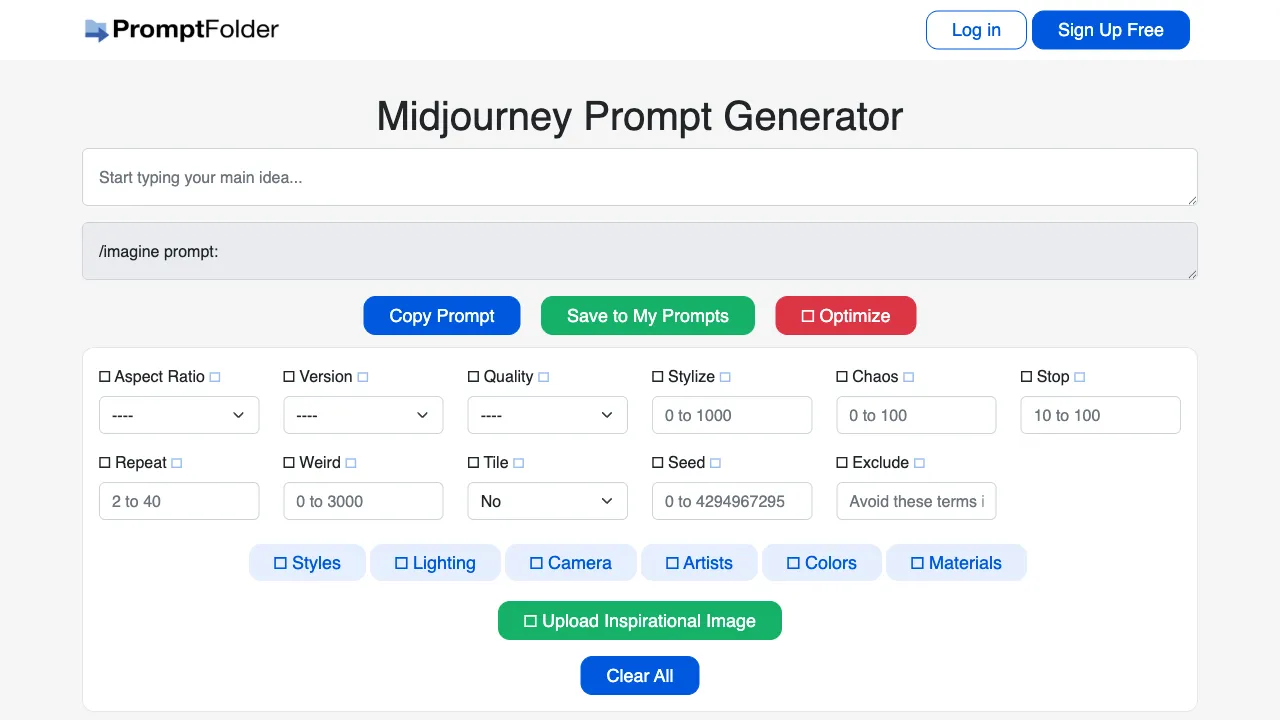
The entry point has changed. The original address, prompt.noonshot.com, now redirects to the Midjourney Prompt Helper operated by PromptFolder (promptfolder.com/midjourney-prompt-helper/), and the link on this page has been updated to match. The new tool is run by a different operator but does the same job — assembling prompts visually with aspect ratio, version and style parameters — and it is free.
Midjourney’s prompt syntax and parameter system have a steep learning curve for beginners. MJ Prompt Tool (prompt.noonshot.com) is a prompt builder designed specifically for Midjourney. Through a visual interface, it helps users quickly construct high-quality Midjourney prompts without needing to memorize every parameter and keyword.
Version lag (checked 2026-09-06): the tool's version dropdown stops at Midjourney 1–6 plus niji, while Midjourney's official default model is now V8.2.
--qwas dropped in the V8 generation,--crefnever went past V6 and Niji 6, and--orefexists only on V7. It still works for assembling the basic structure of a prompt, but the version and any newer flags have to be checked against the official docs and edited by hand.
What Is MJ Prompt Tool?
MJ Prompt Tool is a Midjourney-specific prompt generator launched by Noonshot. Unlike general-purpose AI prompt tools, it is fully optimized for Midjourney’s syntax rules and parameter system, covering MJ’s various functional parameters and style options.
The tool’s core interaction works as follows: users select options on the interface (such as style, image parameters, and composition settings), and the tool generates the corresponding MJ prompt in real time. Users can then copy this prompt directly into Midjourney’s /imagine command.
Feature Coverage
Subject Description Assistance
Guides users in describing the core theme of the image—whether it is a person, landscape, architecture, or abstract concept. It provides categorized prompts to help users translate their ideas into English descriptions that MJ can understand.
Art Style Selection
Includes a large library of proven MJ style keywords, grouped by category:
- Artist styles (Claude Monet, Van Gogh, Greg Rutkowski, etc.)
- Art movements (Impressionism, Art Nouveau, Cyberpunk, etc.)
- Illustration styles (Anime, Comic Book, Concept Art, etc.)
- Photography styles (Portrait Photography, Street Photography, etc.)
Users can select multiple style options, and the keywords will be automatically combined.
Rendering Engine and Software Keywords
For 3D-rendered images, it provides common rendering engine keywords (Unreal Engine, Octane Render, Cinema 4D, etc.). These terms significantly influence the perceived quality and realism of the image in MJ.
Lighting Settings
Keywords for various lighting types:
- Natural light (Golden Hour, Blue Hour, Overcast Sky)
- Artificial light (Studio Lighting, Neon Lights, Candlelight)
- Dramatic lighting effects (Chiaroscuro, Rim Light, Dramatic Lighting)
Composition and Perspective
- Camera distance (Close-up, Wide Shot, Extreme Close-up)
- Angle of view (Bird's Eye View, Worm's Eye View, Isometric)
- Composition rules (Rule of Thirds, Symmetry, Golden Ratio)
Midjourney Parameter Configuration
This is MJ Prompt Tool’s core advantage over general prompt tools—it includes a complete set of MJ parameters:
Aspect Ratio (--ar): Common ratios such as 1:1 (square), 16:9 (landscape), 9:16 (portrait), and 3:2.
Stylize Intensity (--s): A slider ranging from 0 (closest to the description) to 1000 (most artistic freedom).
Model Version (--v): Select different MJ versions (v5, v6, niji, etc.).
Chaos (--c): Controls the degree of random variation in the generated results.
Quality Setting (--q): Different quality tiers: 0.25, 0.5, 1, and 2.
Negative Prompt (--no): Input elements you do not want to appear in the image.
While these parameters are documented in MJ’s official documentation, remembering all of them and their syntax takes time for beginners. MJ Prompt Tool integrates them into a visual interface, significantly reducing the learning cost.
Real-Time Prompt Preview
As users select various options, the tool displays the complete generated prompt text on the right side in real time. This allows users to see how each selection affects the final prompt content, helping them understand the structural composition of MJ prompts.
Comparison with Other MJ Prompt Tools
vs. PromptoMania: PromptoMania is also an AI painting prompt generator that supports both MJ and Stable Diffusion. While it has broader functionality, its specific depth for MJ is slightly lower. MJ Prompt Tool focuses exclusively on Midjourney, offering more complete parameter coverage and a better user experience for MJ.
vs. Catjourney (--sref Style Library): Catjourney focuses on providing --sref style code references for Midjourney; it is a tool to help find style codes. MJ Prompt Tool is a comprehensive prompt builder with broader coverage.
vs. Trial and Error Directly in MJ: Direct trial and error is the most effective way to learn prompts, but it consumes many generation credits. MJ Prompt Tool helps users construct more reasonable prompts before starting, reducing the number of ineffective attempts.
vs. Using ChatGPT to Assist with Prompts: Describing your desired effect to ChatGPT and having it write the MJ prompt is effective for users who already have clear ideas. MJ Prompt Tool is better suited for those still exploring what effects they want; its visual options help discover possibilities.
Who Is MJ Prompt Tool For?
Midjourney Beginners: If you are new to MJ and unfamiliar with prompt syntax and parameters, MJ Prompt Tool allows you to quickly generate decent-quality results while learning the structure of prompts through use.
Intermediate Users Seeking Higher Output Quality: If you already know how to write basic prompts but are unsure which parameters or style keywords are most effective, MJ Prompt Tool provides a systematic library of options to help you discover keyword combinations you haven’t tried yet.
Content Creators Needing Batch Generation of Series Images: Use MJ Prompt Tool to quickly adjust different styles and parameters for the same theme, efficiently generating variants in a consistent series style.
Creators Who Don’t Want to Memorize MJ Parameters: If you want to focus solely on creativity and results, let the tool handle the memorization of parameters, reducing the mental load of using MJ.
Pricing
Free.
PromptFolder's Midjourney Prompt Helper, which the old noonshot domain now redirects to, is free — assembling prompts visually and setting aspect ratio, version and style parameters all cost nothing. The site offers signup and other free tools, but you do not need an account to use the prompt helper.
Worth stating plainly: the tool only assembles the prompt string. Generating the image still costs money on Midjourney's side — Midjourney has no free tier.
Usage Recommendations
Use the tool as a learning resource: Don’t just mechanically select options; pay attention to how the prompt changes when you add each keyword or parameter, and verify whether the actual results in Midjourney match your expectations. This approach helps you gradually develop an intuitive understanding of the effects of different keywords and parameters.
Verify with actual generation: Different versions of Midjourney respond differently to keywords, so prompts generated by the tool may not always yield ideal results. Real-world testing and adjustment remain necessary.
Build your own keyword library: Record keyword combinations that perform well in Midjourney after testing, creating a personal style library. This approach is more sustainable and effective than relying solely on the tool.
MJ Prompt Tool is a practical tool that lowers the barrier to entry for using Midjourney. It is particularly valuable for prompt beginners, helping them construct structurally sound prompts with complete parameters from the very first step, rather than staring at a blank input box unsure of where to start.