

Black-and-white photos have a peculiar psychological effect: they make the past feel "distant." The people in the photos seem to inhabit another abstract world rather than being real humans who breathed the same air as us. But the moment color is restored, the barrier of time suddenly vanishes: Grandfather’s blue cloth shirt from his youth was actually this shade; the sign at the old street corner was originally red—history instantly shifts from "archive" back to "life." This is the enduring charm of photo colorization and why content featuring historical image colorization always attracts traffic on social media.
Manual colorization used to be an extremely specialized craft (retouchers studied, adjusted, and painted each region one by one; a single photo could take days). Palette.fm has turned it into: upload, three seconds, color output.
What is Palette.fm?
Palette.fm is a web-based tool focused on AI colorization of black-and-white photos, created by Swedish machine learning engineer Emil Wallner. He hasdeep cultivation (deeply cultivated) this vertical niche for years; his early open-source colorization projects were widely circulated in the tech community, and Palette.fm is the productized crystallization of that accumulation. The tool enjoys an excellent reputation on platforms like Product Hunt and is one of the most recommended names in its category.
The principle in a nutshell: AI has learned "what the world usually looks like" from massive amounts of color photos—skin tones, greenery, sky blues, reflections of different materials—and during colorization, it infers the most reasonable colors for each region based on semantic understanding of the image content.
Core Features
AI Automatic Colorization
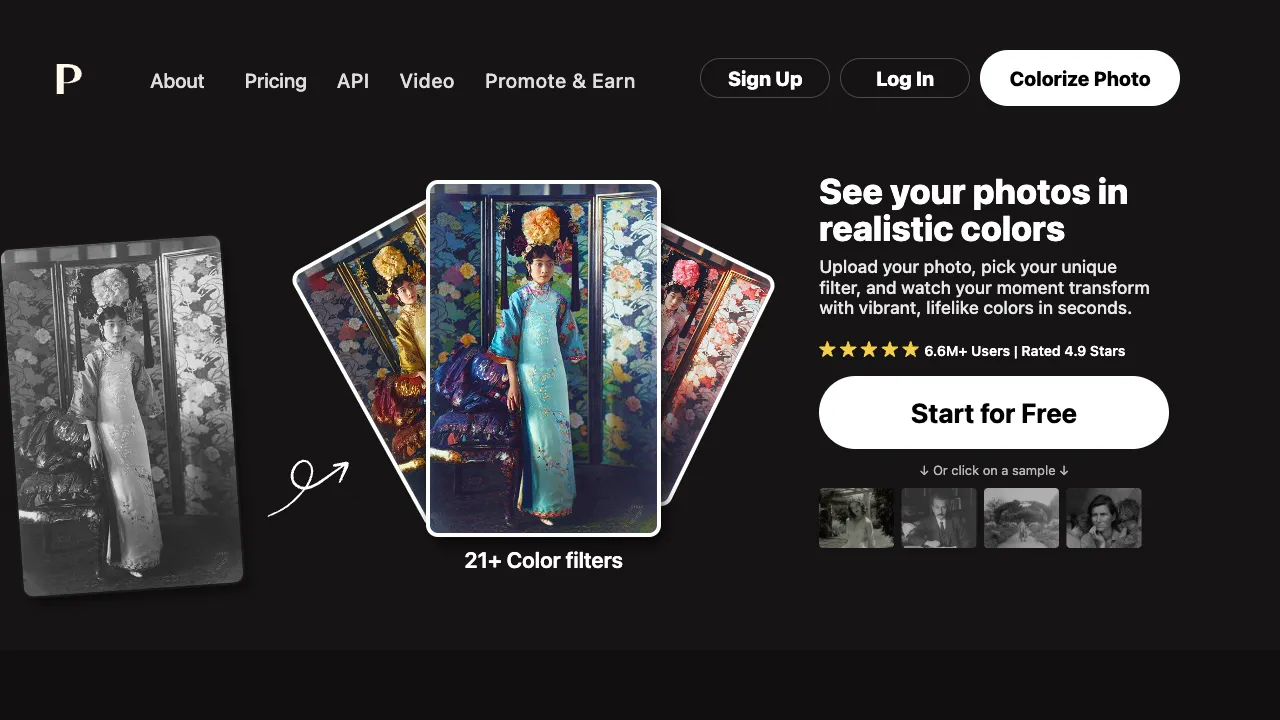
Upload a black-and-white photo and receive a colorized version in seconds. The AI’s content understanding is quite nuanced: skin tones are inferred by features, plants are colored by seasonal feel (withered leaves won’t turn green), skies are judged by lighting atmosphere to determine sunny or cloudy conditions, and fabrics are colored by texture. The overall coordination of the output is the source of its good reputation—it doesn’t just "brush on colors," but makes it look "as if it was originally shot in color."
Over Twenty Color Filters: The Soul of the Product
The smartest thing about Palette.fm is that it doesn’t just provide one "standard answer," but offers over twenty colorization styles:
- Realistic/Natural: Colors close to real photography
- Cinematic: Warm or cool tonal styles, evoking old movie atmospheres
- Vintage: Slightly faded warm tones with a sense of era, matching the psychological expectation of "what old photos should look like"
- Vivid/Artistic: High-saturation expressive color schemes
Switching filter styles on the same photo is like trying on twenty different color schemes for free—this design cleverly transforms the technical limitation of "AI’s guessed colors might not be right" into a product experience of "you pick the atmosphere you like."
Text-Guided Colorization
Advanced usage: Use text prompts to describe color information ("red dress, dusk lighting") to guide the AI toward specific color directions. Users who know the true colors of the photo (e.g., family members remember that shirt was green) can use this to approach a true-to-life restoration.
HD Output and Comparison Preview
One-click toggle between original and colorized versions for comparison; the free version has resolution limits, while paid subscriptions unlock HD downloads to meet printing and collection needs.
Comparison with Similar Tools
vs MyHeritage Photo Colorization: A companion feature of a genealogy platform, combining its "old photos come alive" effect for an emotional combo punch in family history scenes; tied to its subscription system. For pure colorization style diversity, Palette.fm is richer.
vs Comprehensive Restoration Tools like jpgHD: Those tools take a one-stop approach of "restoration + upscaling + colorization"; Palette.fm focuses on deep verticality—doing only colorization, but with deeper style selection and quality refinement. If an old photo is very blurry, the correct workflow is to first use a restoration tool (like RestorePhoto) to clarify it, then colorize it here; two steps yield far better results than one.
vs Photoshop Manual Colorization: Professional retouchers’ manual colorization based on historical materials remains the ceiling for precise restoration (the standard practice for historical publications), billed by hours and days; AI solutions offer a democratized "good enough" alternative.
vs Built-in Colorization in Various Apps: The colorization features in mobile photo apps excel in convenience, but their quality and style options are average; for treating a meaningful photo seriously, a dedicated tool is worth the extra two minutes.
Who Should Use Palette.fm?
People Organizing Family Old Photos: The warmest use case—colorizing elders’ old photos and printing them as gifts; this "digital filial piety" offers emotional returns far exceeding the tool’s cost.
Historical Content Creators: For history education accounts and documentary-style content, those who have done it know the visual impact and spreadability of colorized historical images.
Museums and Cultural Institutions: For revitalizing displays of historical archives, colorized versions bring the public closer to history (formal exhibitions must note AI colorization, see below).
Designers and Creators: Reverse usage—converting modern photos to black-and-white then colorizing them to create specific vintage tones; or quickly assigning atmospheric colors to black-and-white assets.
Boundaries You Must Know
AI colorizes "reasonable colors," not "true colors"—AI doesn’t know what color that shirt actually was back then; it provides the statistically most probable answer. For family commemorative purposes, this doesn’t matter (as long as it looks good and harmonious); but for historical research and formal publishing scenarios, AI colorization can only serve as a reference, not as historical evidence. Noting "AI Colorized" when used publicly is a basic requirement of academic and media ethics.
Unusual colors will inevitably be guessed wrong: For a rare purple coat from that era, the AI will likely colorize it brownish-gray—use the text-guided feature to correct if you know the true color.
Original image quality determines the upper limit: Blurry photos with heavy noise should be restored first, then colorized; don’t reverse the order.
Pricing
The site offers a Start for Free entry point — upload a photo, pick a filter and see the result.
It also has dedicated pricing and API pages, plus video colourisation and a Promote & Earn programme, but no tiers or amounts appear on publicly readable pages, so no figures are given here. Trust the pricing page at palette.fm.
What is verifiable on the product side: 21 or more colour filters, applied by choosing one after upload, and the site states it has passed 6.6 million users.